Understanding the Concept of Selfie Mosaic
What is a Selfie Mosaic?
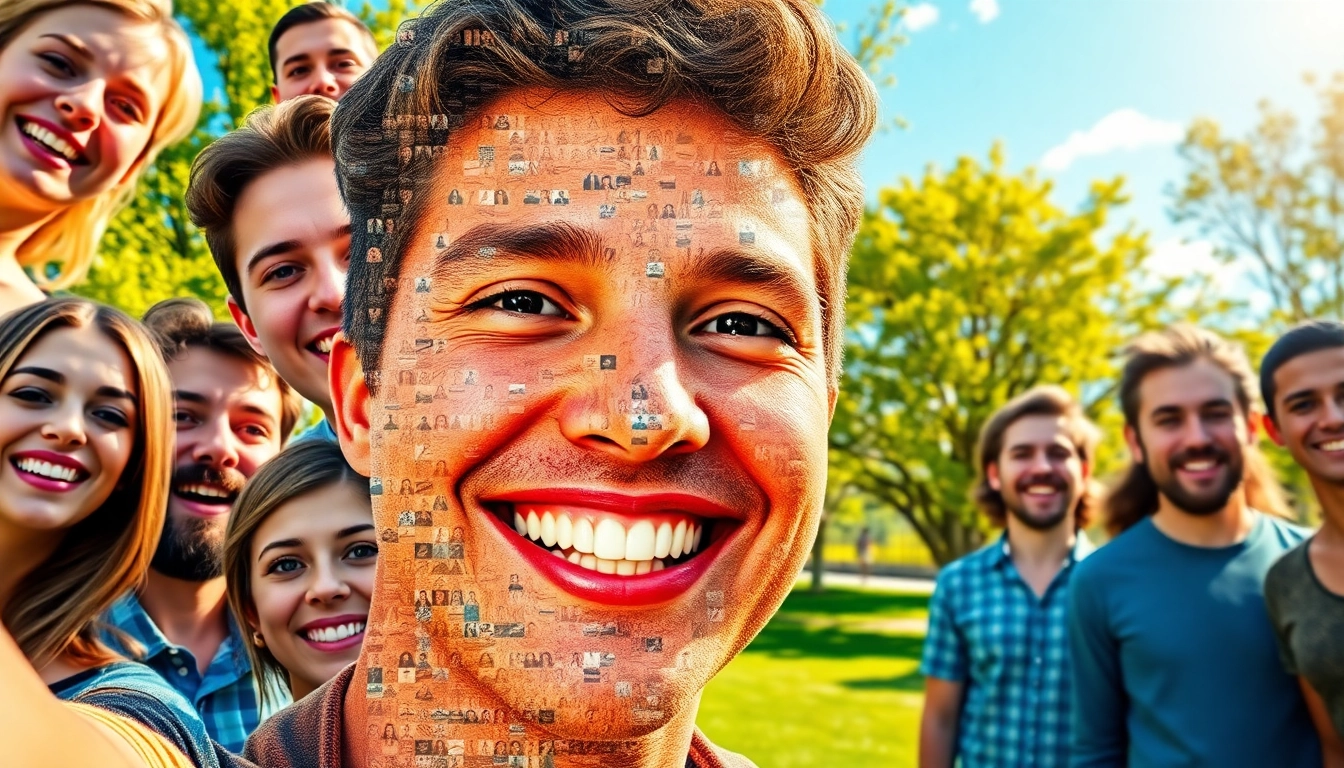
A selfie mosaic is a photographic composition that combines numerous individual selfies into a single, larger image. Often used to create visual representations of a person's personality, interests, or significant life events, these mosaics create an intricate tapestry of emotions and memories. The beauty of a selfie mosaic lies not only in its artistic layout but also in its ability to convey a larger narrative, drawing viewers in for a closer look at the individual images that come together to form something greater.
History and Evolution of Selfie Art
The concept of selfies can be traced back to the rise of personal photography and social media platforms. In the early 2000s, the advent of smartphones and front-facing cameras revolutionized how people portrayed themselves online. Initially, selfies were simply a form of personal expression on platforms like MySpace and later on Facebook and Instagram. As these images proliferated, creative individuals began to group them into mosaics, mixing technology with art. This evolution has marked selfies as not just personal memories but as significant cultural artifacts reflecting societal shifts in identity and connection.
The Cultural Impact of Selfie Mosaic
Selfie mosaics have significantly influenced contemporary art and culture. They often challenge traditional notions of beauty and identity by allowing individuals to represent themselves through multiple perspectives. As cultural phenomena, they encourage communal participation as friends or family contribute their images to a shared project, fostering a sense of unity and connection. Moreover, these mosaics have been utilized in various campaigns and events, celebrating milestones and movements, thereby cementing their place in modern visual culture.
Tools and Software for Creating Selfie Mosaic
Best Software Options Available
Creating a selfie mosaic requires the right tools to achieve a professional look. Popular software includes Adobe Photoshop, which offers extensive design capabilities but might have a steep learning curve for beginners. Other platforms like Mosaically cater specifically to mosaic creation, providing user-friendly features to streamline the image integration process. Additionally, software such as AndreaMosaics can help automate the mosaic process, allowing users to focus more on creativity rather than technical intricacies.
Online Platforms for Easy Creation
Online platforms have made it simpler than ever to create stunning selfie mosaics. Websites like Mosaic Maker and PicMosaic allow users to upload their images quickly and customize their creations, often with just a few clicks. These platforms typically offer a variety of templates and styles, ensuring each user can find a layout that resonates with their vision while eliminating the need for extensive graphic design skills.
Mobile Apps for On-the-Go Creations
For those who prefer to create on the move, several mobile apps facilitate selfie mosaic creation directly from smartphones. Apps such as Photo Mosaic Maker provide easy-to-use interfaces, allowing users to create mosaics from photos stored on their devices. These apps often include features for immediate sharing on social media, making it convenient to showcase creations to friends and followers.
Creating Your Own Selfie Mosaic
Gathering the Right Photos
The first step in creating a selfie mosaic is gathering a collection of high-quality photos. It’s essential to select images that reflect the theme or mood of your mosaic. Aim for diversity in expressions, backgrounds, and color palettes to enhance the visual impact. High-resolution photos yield better results, so avoid tiny thumbnails or low-quality images that could result in pixelation when expanded during mosaic construction.
Choosing a Theme and Design
A cohesive theme will set the tone for your mosaic. Themes could be personal, such as family milestones, or more abstract, like colors or feelings. Once a theme is decided, sketch out a rough layout or design idea for how the images will be arranged. This approach not only guides your photo selection but also helps in visualizing the final output, ensuring a smoother creation process.
Step-by-Step Creation Process
To create your selfie mosaic, begin by importing your chosen images into your selected software or app. Follow these comprehensive steps:
- Upload Photos: Load all your images into the software.
- Select a Grid Size: Depending on your design, choose the dimensions for your mosaic grid.
- Arrange Images: Either let the software automatically arrange them or do it manually for personalized placement.
- Adjust Colors: Enhance or modify colors to ensure the images blend harmoniously.
- Preview and Edit: Check the mosaic for any adjustments needed before finalizing.
- Export: Save your masterpiece in the desired format.
Tips for a Stunning Selfie Mosaic
Color and Composition Considerations
A successful selfie mosaic balances color and composition. Consider using photos with a similar color scheme to enhance coherence. Pay attention to lighting and shadows, as this can greatly affect how images blend together. Strong contrast can create a striking visual impact, while softer tones can evoke warmth and intimacy.
Incorporating Text and Other Media
Adding text or other media can provide context to your mosaic. Consider placing a meaningful quote or the date of a significant event to enrich the narrative. However, ensure that any text complements rather than detracts from the images. Overlaying the text lightly can maintain the immersive experience for viewers while providing that extra layer of meaning.
Common Mistakes to Avoid
When creating a selfie mosaic, several pitfalls can undermine your efforts. Common mistakes include:
- Using low-resolution images that compromise mosaic quality.
- Choosing too many similar images which can result in a monotonous look.
- Neglecting to plan your theme, leading to a lack of cohesiveness.
- Forgetting to preview arrangements before finalizing, which can cause unsatisfactory results.
Sharing and Showcasing Your Selfie Mosaic
Best Practices for Social Media Sharing
The act of sharing your selfie mosaic is an opportunity to connect with an audience. Choose the right platform where your target audience is likely to engage. Use relevant hashtags to increase visibility and encourage interaction by asking viewers to share their own experiences or thoughts about the mosaic. Regular engagement through comments and replies can amplify your reach dramatically.
Offline Display Options
Consider displaying your selfie mosaic in physical spaces, especially if it tells a personal story. Options include printing the mosaic on canvases, making it a part of an art show, or even using it in merchandise like t-shirts or mugs. Offline displays can breathe new life into your mosaic, allowing viewers to appreciate the finer details up close.
Engaging Your Audience with Selfie Mosaic
Engagement extends beyond merely sharing an image. Create a dialogue around your mosaic by sharing the backstory of the photos used. Prompt your audience to share their own selfies or curate their mosaics, fostering a community experience. Polls or contests around themes and creations can also maximize engagement and interest, keeping the momentum alive.
Frequently Asked Questions
What is a selfie mosaic?
A selfie mosaic is a large image composed of numerous individual selfies, creating a unified visual narrative when viewed from a distance.
How can I create a selfie mosaic?
You can create a selfie mosaic using various software, online platforms, or mobile apps by gathering photos, selecting a theme, and arranging them into a grid layout.
What software is best for making selfie mosaics?
Popular options include Adobe Photoshop for advanced features, while Mosaically offers user-friendly tools specifically for mosaic creation.
Can I use selfies from social media for my mosaic?
Yes, as long as you have permission to use images and they meet quality guidelines for your intended purpose.
How can I best display my finished selfie mosaic?
You can display your mosaic online through social media, or physically in print formats like canvases or merchandise like mugs and t-shirts.